Building Munchii
Dogfooding Munchii: How a Release Orchestrator Deploys Itself
How I use Munchii to orchestrate its own production releases—and what I've learned along the way.
Why Munchii deploys itself
I built Munchii to help engineering teams make their release processes more predictable. It coordinates the steps that take a change into production and provides visibility into release progress.
Munchii also uses itself to manage its own production releases.
I've spent years working on release orchestration and have developed my own ideas about how it can be improved. Building Munchii gives me the opportunity to explore those ideas, and using it for my own deployments means I experience the platform as both its developer and an operator. Every time I release a change, I'm using the same workflows and tools I'm building for others.
Using Munchii to release Munchii creates a continuous feedback loop: I encounter limitations while using the platform as a customer would, use those experiences to guide improvements, and deploy those improvements through Munchii itself.
Bootstrapping the release orchestrator
Munchii began with a simple executor capable of performing individual deployment tasks, such as updating cloud infrastructure.
From there, I added the ability to coordinate tasks, define dependencies, and manage their execution as part of a release.
I also needed a way to connect releases to the software being built. Rather than build another CI system, I integrated Munchii with GitHub Actions, which already handled building and testing my code. The CI workflow could then trigger Munchii releases using the artifacts it produced.
This separation remains central to Munchii's design: CI builds the software, while Munchii coordinates how it gets released.
From commit to production
A change to this website is a useful example of how the pieces fit together. When I push a commit — including the article you're reading — a CI workflow builds the applications, runs lint checks and tests, and packages the resulting artifacts.
For the website, the build produces two artifacts: an archive containing the website's pages and assets, and a synthesized AWS CDK assembly describing its infrastructure. Both are produced from the same source revision. Munchii then orchestrates the deployment of these artifacts without rebuilding them for each environment.
The workflow authenticates with Munchii using OpenID Connect (OIDC), avoiding the need to store long-lived credentials.
The workflow then uses the Munchii CLI to prepare and start a release. For the website, it creates a release draft, records the recent Git commit history, and uploads the website and CDK artifacts. Once the draft is ready, the workflow starts the release, handing control over to Munchii to orchestrate the deployment.
Once started, Munchii executes the release according to the pipeline's configured targets and dependencies. For the website, that includes deploying the infrastructure and publishing the website artifacts to S3, first in test and then in production.
Unlike deployment scripts running inside CI, Munchii independently manages the release's progression, tracks the outcome of each target, and maintains its execution history.
Orchestrating the rollout
This website's pipeline — named www — is a relatively simple example of how Munchii coordinates a release. It deploys the website through two groups, test and prod, each containing targets that perform deployment and verification work.
In the test group, the release first updates the infrastructure (test.stack), then publishes the website to S3 (test.www). Once the website is deployed, two targets can run independently: an end-to-end test (test.e2e) and a ten-minute bake period (test.bake). Both must complete before the release can proceed to production.
The production group depends on the test group. It follows a similar process, updating the infrastructure, publishing the website, and running end-to-end tests. Dependencies determine which targets can run concurrently and which must wait for earlier work to finish.
The two groups also use different release-selection policies. Test selects the latest available release, allowing it to skip older releases when newer changes arrive. Production processes releases sequentially, preserving their order. Both groups limit concurrency to one active release at a time. These choices help balance rapid feedback in test with predictable deployments in production. Learn more about designing safer release processes.
The pipeline defines these rules, while Munchii handles scheduling, execution tracking, and release history.
The website is only one part of Munchii's production environment. Other pipelines manage the API, console, runners, and supporting infrastructure using similar pipeline topologies.
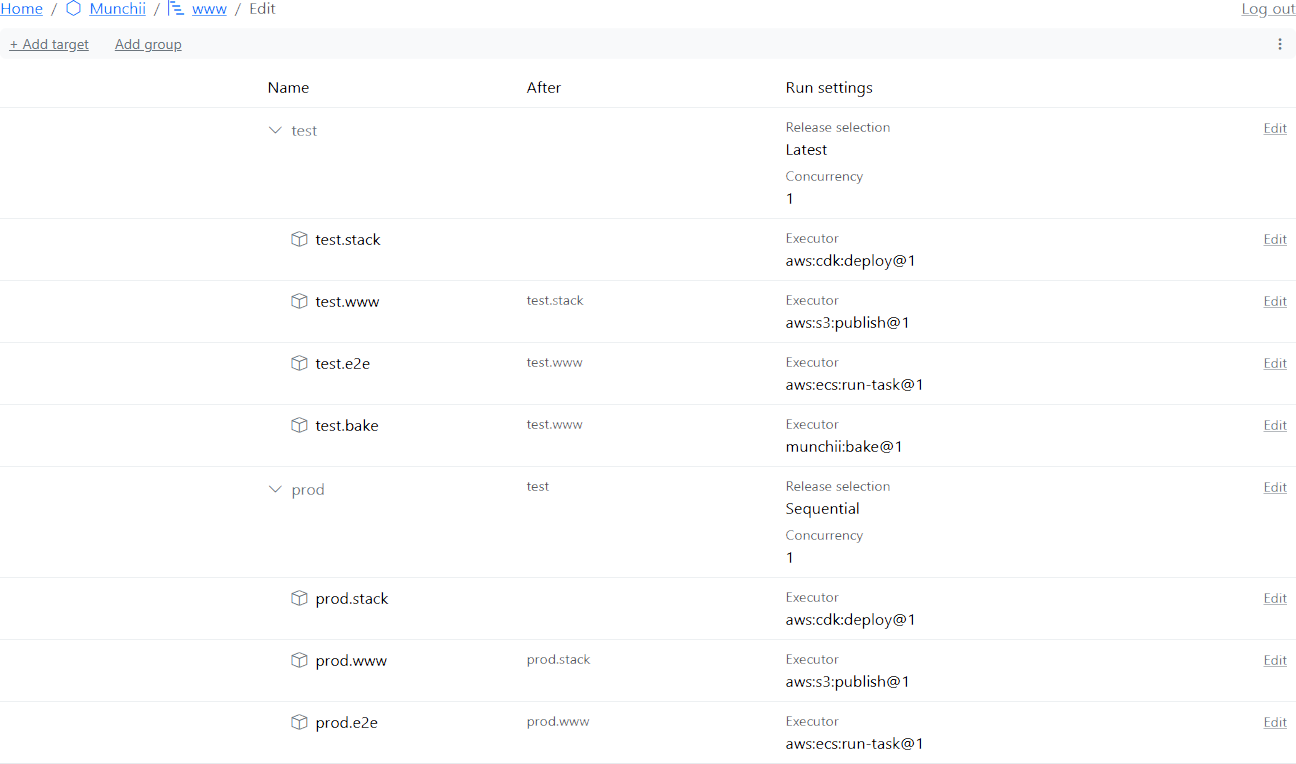
www pipeline's dependencies and run settings. Select the image to view it at full size.You can also explore the live www pipeline to see how Munchii manages its own website releases, including the current pipeline state and recent release history.
Deploying the system that's deploying
One interesting consequence of using Munchii to deploy itself is that the components coordinating a release can change while that release is still in progress.
As the API, dispatcher, and runners are updated, subsequent operations use the newly deployed versions. Tasks already running continue uninterrupted, so a release can begin under one version of Munchii and finish under another.
This makes compatibility between versions important. Release state must remain understandable across updates, and changes to the API or execution behavior must account for work started by an earlier version.
What dogfooding has taught me
Using Munchii for its own releases has helped me identify limitations that aren't always obvious when designing features in isolation. Some have led to improvements in the platform, while others remain on my roadmap.
Understanding why a release is waiting
A release doesn't have to fail to need attention. It might be waiting for a dependency, for another release to finish, or for a disabled target to become available. Knowing that a release is waiting isn't enough; I also need to understand why.
This has led to improvements in how Munchii shows blocking dependencies, group capacity, and disabled-target reasons. The goal is to make it easier to distinguish a release that's progressing normally from one that needs intervention, without having to reconstruct the scheduler's decisions myself.
The deployment system must be able to upgrade itself
Using Munchii to deploy itself introduces a compatibility challenge that most customers wouldn't encounter. When upgrading the version of AWS CDK used to build deployment artifacts, the currently deployed executor must still be able to process those artifacts.
For a customer, an unsupported version would mean waiting for Munchii to add support. For Munchii itself, the consequences are more serious: If the existing executor cannot process the new artifacts, it cannot use those artifacts to deploy its own replacement.
This led me to add compatibility tests for the core executors Munchii uses to deploy itself. These tests help ensure that changes to build tools and deployment artifacts remain compatible with the currently deployed executors, so Munchii can continue upgrading itself.
Release safety requires more than testing
The test environment gives me an opportunity to validate releases before they reach production, but no amount of testing can guarantee that every defect will be caught. A breaking change can still reach production and interfere with the tools I need to fix it.
One improvement I'm considering is adding a stable cell alongside the existing test and production cells. It would deliberately lag production, providing an independently deployed version of Munchii that I could use if a newer release caused problems.
This would reduce my dependence on the latest version of Munchii when diagnosing and recovering from production failures.